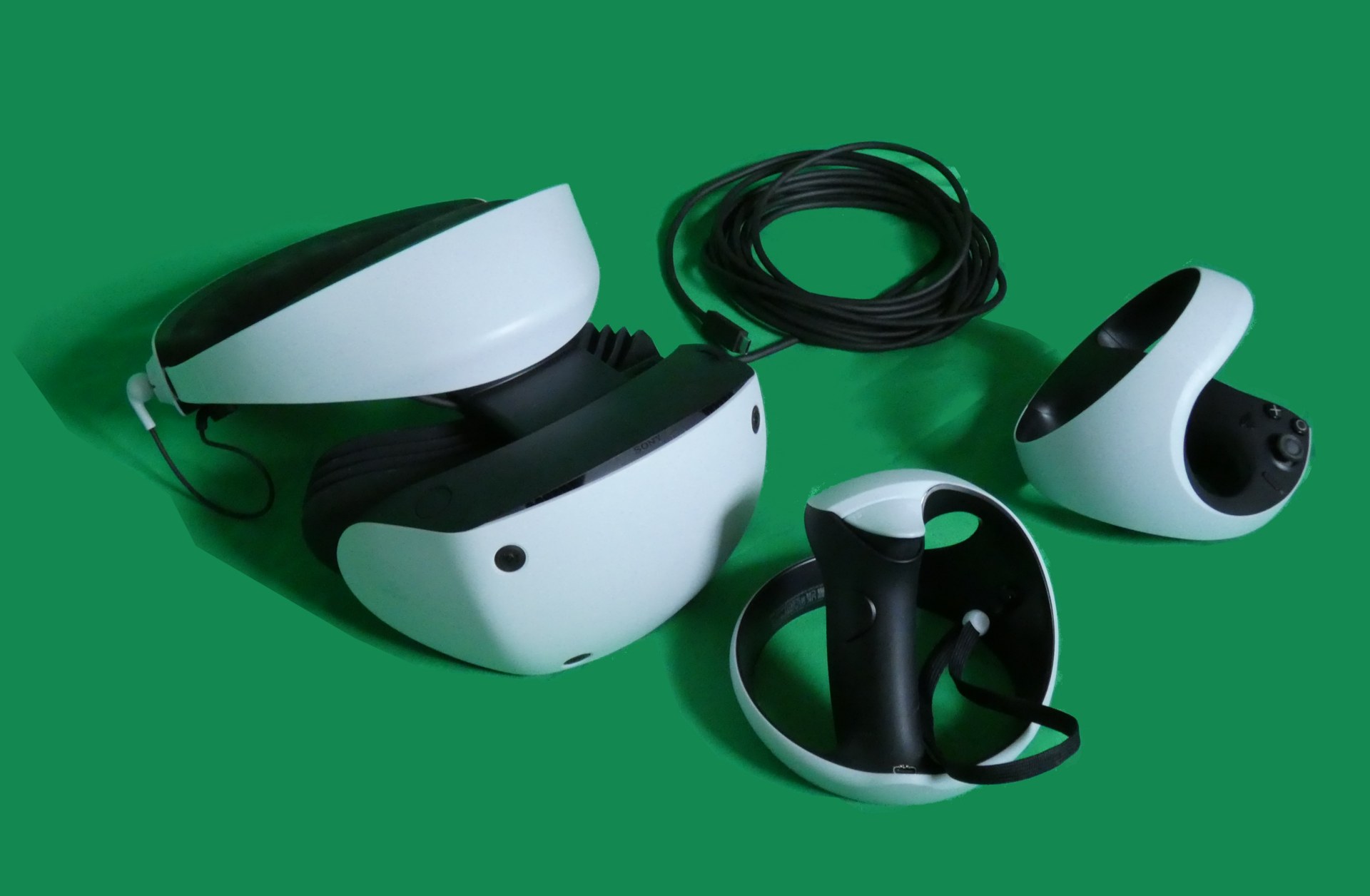
PS VR2 is Sony’s second virtual reality headset, and it plugs into a PlayStation 5 with a single USB-C cable. It is not wireless and it does not work on a PS4. In the US it costs $399.99 after Sony’s March 2025 price cut. This guide covers the hardware, the Sense controllers, the games and the setup, so you can decide whether it belongs next to your console.
What PS VR2 actually is
Sony sells it as PlayStation VR2. You will also see it written as PS VR2, PSVR2, PS5 VR2 headset and sometimes just PSV2. All of these names refer to the same product: the headset Sony launched on February 22, 2023.
It replaced the original PlayStation VR from 2016, which ran on the PS4. The new model is a different machine in almost every way. It has built-in tracking cameras, OLED screens, eye tracking and new controllers. It needs no external camera and no breakout box.
PS VR2 is a tethered headset. Your PS5 does all the rendering, and the headset handles display, tracking and feedback. That makes it different from a Meta Quest, which has its own chip, battery and app store.
What comes in the box
The standard PS VR2 box includes:
- The PS VR2 headset with its attached cable
- Two PS VR2 Sense controllers (left and right)
- A USB-C charging cable for the controllers
- Stereo headphones with spare ear tips
- Printed safety and setup material
There’s no charging dock and no carrying case in the box. Sony sells a Sense controller charging station separately.
PS VR2 specs
Most of the numbers below come from Sony’s published specifications. Where Sony gives an approximate figure, the table says so.
| Spec | PlayStation VR2 |
|---|---|
| Display | OLED, HDR |
| Resolution per eye | 2000 x 2040 |
| Refresh rate | 90Hz and 120Hz |
| Field of view | About 110 degrees |
| Lenses | Fresnel, with lens adjustment dial |
| Tracking | Inside-out, four built-in cameras |
| Eye tracking | Yes, one IR camera per eye |
| Headset feedback | Single built-in vibration motor |
| Audio | 3.5mm jack, Tempest 3D AudioTech |
| Connection | USB-C to PS5 |
| Cable length | About 4.5 m |
| Headset weight | About 560 g (without cable) |
| Controllers | PS VR2 Sense, adaptive triggers, haptics |
| Launch date | February 22, 2023 |
| Current US price | $399.99 |
Sony markets the combined panel resolution as “4K HDR.” That claim refers to two 2000 x 2040 screens side by side. Each eye sees its own 2000 x 2040 image.
Is PS VR2 wireless?
No. PS VR2 uses one wired USB-C connection to your PS5, and there is no official wireless mode or wireless adapter.
The single cable is still a big improvement over the first PlayStation VR. That headset needed an HDMI lead, a processor unit and a separate camera. PS VR2 has one cable that runs from the back of the headband to the front USB-C port on your console.
The cable carries video, power and data, so the headset has no battery to charge. You can play for as long as your comfort allows, and you won’t hit a battery warning mid-session.
The trade-off is the tether. In room-scale games you will occasionally feel the cable or step on it. Many owners route it over a shoulder or use a ceiling pulley system to keep it off the floor.
Player tip
Before a standing session, drape the cable behind your dominant shoulder. You will tangle it far less when you turn left and right.
What you need to use PS VR2
A compatible console
PS VR2 works with every PS5 model:
| Console | Works with PS VR2 | Notes |
|---|---|---|
| PS5 (launch model, disc) | Yes | Front USB-C port |
| PS5 Digital Edition (launch) | Yes | Front USB-C port |
| PS5 Slim (disc and digital) | Yes | Front USB-C port |
| PS5 Pro | Yes | Some games enhanced for Pro |
| PS4 / PS4 Pro | No | Not supported |
| PC | Only with $59.99 adapter | Some features disabled |
Plug the headset into a USB-C port on the front of the PS5. Make sure your console’s system software is up to date before the first setup, because the headset needs current firmware.
A PlayStation Network account and the right age
You sign in on your PS5 as normal. Sony says PS VR2 is not for children under 12, and parental controls on the PS5 can restrict VR use for child accounts. If you share a console with younger family members, set this up before the headset arrives.
Enough room
Sony supports three play styles:
- Seated: you stay in a chair, ideal for racing and cockpit games.
- Standing: you stand still, with minimal movement around a small area.
- Room-scale: you move around a defined boundary, which Sony says needs at least 2 m x 2 m (about 6.5 ft x 6.5 ft).
The PS VR2 boundary system lets you draw your play area with a Sense controller. When you get close to the edge, a grid appears in the view.
Display and image quality
OLED and HDR
PS VR2 was one of the first mainstream VR headsets to use OLED panels. OLED gives you true blacks, because each pixel can switch off completely. Dark games look dramatically better as a result.
Horror games such as Resident Evil Village in VR mode benefit most. Shadows look like shadows instead of grey haze. Sony also supports HDR, so bright highlights like explosions and sunlight have real punch.
Fresnel lenses and the sweet spot
The lenses are Fresnel lenses, which are thinner than conventional glass but can produce glare and “god rays” around bright objects on dark backgrounds. You will notice it on white menu text against black.
The sweet spot, the zone where the image is sharp, is smaller than on a pancake-lens headset such as the Meta Quest 3. If the image looks blurry, the headset usually isn’t seated correctly. Small adjustments to the headband position fix most complaints.
Mura
Some owners notice a faint grainy texture across flat colours, known as mura. It is a characteristic of the OLED panels used here. Most players stop seeing it once they are absorbed in a game, but if you are sensitive to it, try the headset in a store first.
90Hz, 120Hz and reprojection
Games run at 90Hz or 120Hz. Many 120Hz titles render at 60 frames per second and use reprojection to fill in the gaps. Reprojection is smooth enough for most players, though fast motion can show a slight double image in some games.
Intelligent eye tracking
Eye tracking is the headline feature that set PS VR2 apart at launch. Each eye has an infrared camera that follows where you look.
Foveated rendering
Developers can use eye tracking for foveated rendering. The PS5 draws full detail only where your eyes are pointing and lowers detail in your peripheral vision. You don’t notice the trick, because your eyes can’t see fine detail outside the centre anyway.
This frees up GPU power. It is a big part of why games such as Horizon Call of the Mountain look as rich as they do on console hardware.
Gameplay and menus
Some games use eye tracking for interaction. You can aim, select menu options or make characters react to your gaze. The system also uses it during setup to help you position the headset and align the lenses.
Calibration
During first setup you follow a dot with your eyes to calibrate. Redo the calibration if someone else uses the headset, or if the image looks off after you adjust the fit. You’ll find it in the PS VR2 settings on your PS5.
Introducing the PS VR2 Sense controllers
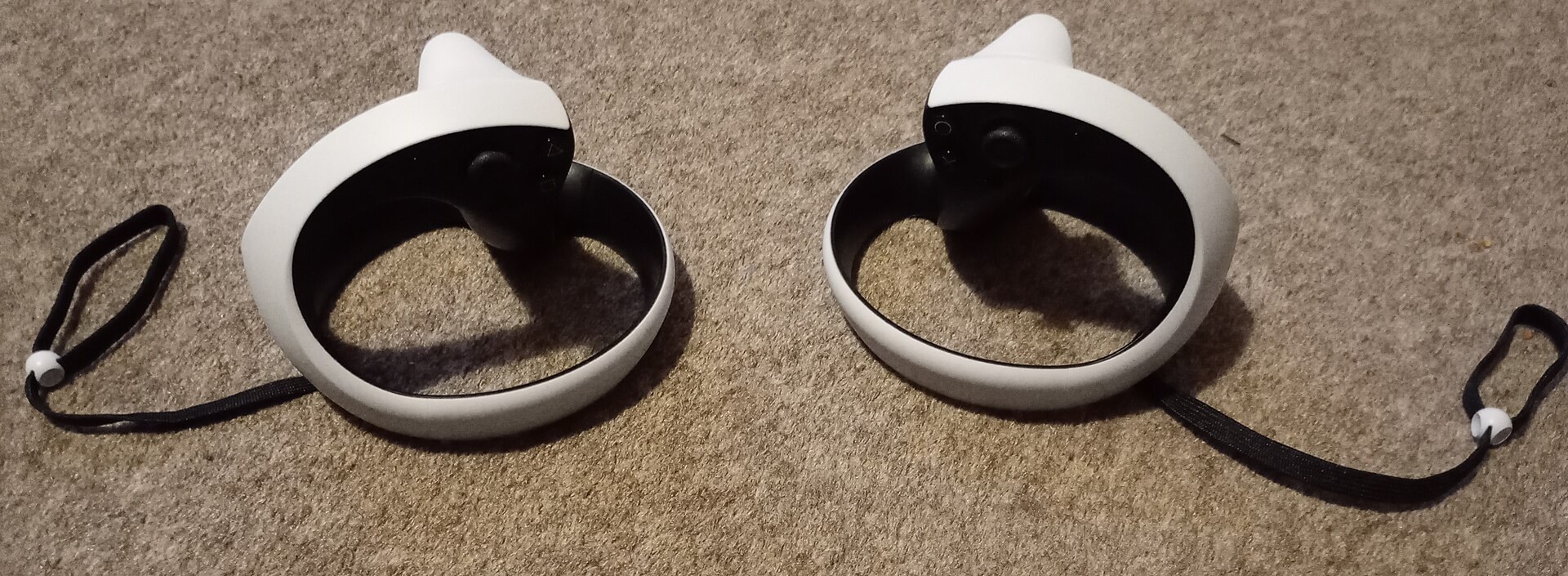
The Sense controllers are ring-shaped, with a tracking loop around your knuckles. They look a little like a split DualSense, and that’s deliberate.
Haptic feedback
Each controller carries detailed haptic motors similar to the DualSense. You feel texture rather than a generic buzz. Plucking an arrow, scraping a climbing pick against rock and feeling a gun’s recoil all have distinct sensations.
Adaptive triggers
The L2 and R2 triggers can change resistance. A bowstring gets tighter as you pull. A stiff trigger can simulate a jammed weapon. This is something you won’t find on most rival VR controllers.
Finger touch detection
The controllers sense when your thumb, index finger and middle finger rest on buttons. Games use this to make your virtual hand point, give a thumbs-up or grip naturally without you pressing anything.
Battery life and charging
The Sense controllers have built-in rechargeable batteries and charge over USB-C. Sony does not publish an official battery life. In our own play they typically last a few long sessions, roughly four to five hours of continuous use, which is shorter than many players expect.
Charge them after every evening of play. The optional charging station clicks both controllers in at once, so they’re ready next time.
Player tip
Charge the Sense controllers on the PS5’s rear USB ports while you play flat games. They’ll top up in rest mode too if you enable USB power in rest mode.
Headset feedback and 3D audio
There’s a small vibration motor inside the headset. Developers use it for sensations near your head: a projectile whistling past, a creature brushing by, your character’s heartbeat during a tense moment. Sony calls it headset feedback.
Audio uses Sony’s Tempest 3D AudioTech. Sound is positioned around you, so you can hear where an enemy is before you see it. The included earbuds plug into the headset’s 3.5mm jack. Any wired headphones work, and many owners prefer over-ear headphones for comfort and bass.
Tracking and see-through view
Inside-out tracking
Four cameras built into the headset track your head and the Sense controllers. You don’t need an external camera or base stations. Tracking is solid in a well-lit room with some visual detail on the walls.
Tracking degrades in very dark rooms and near large mirrors or windows. Bright, featureless surfaces can also confuse it.
Controller blind spots
Because the cameras live on the headset, controllers held behind your back or very close to your face can briefly lose tracking. Games are designed around this, and it rarely matters during normal play.
See-through view
Press the function button on the headset and you get a passthrough view of your room from the cameras. It is grayscale, not colour. It is good enough to find your drink, locate a controller or check where the dog is, but you won’t want to use it for long.
Comfort and fit
PS VR2 uses a halo-style headband that rests on your forehead and the back of your skull. That design puts very little pressure on your face, and it is one of the more comfortable headsets to wear for long sessions.
At about 560 g, it isn’t light, but the weight sits on your head rather than pulling on your cheeks. Glasses wearers generally fit fine, since you can slide the visor forward with the scope adjustment button.
Getting a sharp image comes down to four adjustments:
- Tighten the headband with the rear dial so the halo sits snugly.
- Slide the visor forward or back with the button on the top of the visor.
- Turn the lens adjustment dial until text is crisp.
- Shift the headset slightly up or down until the centre of the image is sharp.
Comfort check
VR can cause motion sickness, especially in games with smooth stick movement. Start with seated or teleport-based games, stop at the first sign of nausea, and take breaks every 30 minutes at first.
Motion sickness and comfort settings
Most PS VR2 games include comfort options. Look for snap turning instead of smooth turning, vignette effects that narrow your view while moving, and teleport movement. These help a lot during your first weeks.
Racing in Gran Turismo 7 is often fine for beginners, because the cockpit gives your brain a fixed reference. Fast first-person shooters with smooth locomotion are harder, so save those for later.
Safety in your play space
Clear the area of furniture, pets and anything breakable. Ceiling fans and low light fittings are a real hazard when you swing your arms upward. Use the wrist straps on the Sense controllers every time.
Setting up PS VR2 on your PS5
Quick steps: set up PS VR2
- Update your PS5 system software.
- Plug the headset into the front USB-C port.
- Pair the Sense controllers with the USB cable.
- Fit the headset and adjust the lens dial.
- Calibrate eye tracking.
- Scan your room and set your play area.
Update the console first
Go to Settings, then System, then System Software, and install any pending update. The headset may also update its own firmware on first connection. Let it finish without unplugging.
Connect the headset
Plug the USB-C cable into the front port on your PS5. The headset wakes up and the setup guide begins on your TV and inside the headset.
Pair the controllers
Connect each Sense controller to the PS5 with the included USB-C cable and press the PS button. Once paired, they work wirelessly over Bluetooth.
Fit, focus and calibrate
The on-screen guide walks you through headset fit, lens alignment and eye tracking calibration. Take your time here. A good fit makes a bigger difference to image clarity than any setting.
Set your play area
The headset scans your floor and surroundings with its cameras. You can accept the suggested boundary or draw your own with a controller. Do this again if you move furniture.
The best PS VR2 games to start with
The library has grown steadily since 2023. It includes big first-party titles, free VR modes for flat PS5 games and well-known ports. Our list of VR games worth your time in every genre goes broader, but these are strong starting points on PS5.
| Game | Genre | Play space | Comfort (our rating) | How you get VR |
|---|---|---|---|---|
| Horizon Call of the Mountain | Adventure, climbing | Standing or seated | Moderate | Full VR game |
| Gran Turismo 7 | Racing sim | Seated | Comfortable to moderate | Free VR mode in base game |
| Resident Evil Village | Survival horror | Standing or seated | Moderate | Free VR mode in base game |
| Resident Evil 4 | Action horror | Standing or seated | Moderate | Free VR mode add-on |
| Beat Saber | Rhythm | Standing | Comfortable | Full VR game |
| Synapse | Action shooter | Standing or seated | Moderate | Full VR game, uses eye tracking |
| Moss and Moss: Book II | Puzzle adventure | Seated | Comfortable | Full VR games |
| Metro Awakening | Horror shooter | Standing | Intense | Full VR game |
Horizon Call of the Mountain
This is Sony’s showcase game, made with Firesprite and Guerrilla. You climb huge cliffs, shoot machines with a bow and look up at enormous creatures. The adaptive triggers make the bowstring feel tight, and the OLED display shows off the scenery well. It was often bundled with the headset.
Gran Turismo 7
Many owners call this the best reason to buy PS VR2. The full game, including every car and track, plays in VR. Sitting in a cockpit and turning your head toward an apex feels transformative. A racing wheel makes it even better.
Resident Evil Village and Resident Evil 4
Capcom added VR modes to both games at no extra cost to owners. Village in particular uses the OLED blacks to frightening effect. These are long campaigns, so you get many hours from a single purchase.
Beat Saber
The rhythm game that sold early VR still works brilliantly here. It is an easy first game for friends and family, and it can be a genuine workout.
Synapse
This stylish shooter from nDreams uses eye tracking for telekinesis: you look at an object and move it with your hand. It is one of the clearest demonstrations of what eye tracking can do in gameplay.
Moss
Moss is a gentle, seated adventure where you guide a small mouse named Quill through diorama-like levels. If you’re worried about motion sickness, start here.
Metro Awakening
This is a tense, atmospheric horror shooter set in the Metro universe. It uses smooth locomotion and dark tunnels. Play it once you have your VR legs.
Cinematic mode: flat games on a big screen
PS VR2 can also display normal PS5 games and media on a large virtual screen. Sony calls this cinematic mode. It shows content in 1920 x 1080 with HDR support.
It works with your whole flat library, and you use a DualSense instead of the Sense controllers. It’s useful if someone else is using the TV, though the image is softer than playing directly on a good 4K television.
PS VR2 on PS5 Pro
The PS5 Pro has more GPU power and Sony’s PSSR upscaling. Sony says select PS VR2 games are enhanced on Pro hardware, with Gran Turismo 7 among the named examples. Expect sharper images and better effects in supported titles.
You don’t need a PS5 Pro to enjoy PS VR2. The standard PS5 and PS5 Slim run every PS VR2 game.
Using PS VR2 on PC
In August 2024, Sony released the PlayStation VR2 PC adapter for $59.99. It lets you play SteamVR games on a Windows PC.
You need a PC with a DisplayPort 1.4 output, Bluetooth 4.0 for the controllers and a graphics card that meets Sony’s listed requirements. You’ll also install the PlayStation VR2 App from Steam, which handles setup and firmware updates.
Some features don’t carry over. Sony states that HDR, headset feedback, eye tracking, adaptive triggers and the Sense controllers’ haptic feedback are not supported on PC. You still get the OLED panels, the comfortable halo strap and the full Steam library.
For PS5 owners who also game on PC, the adapter is good value. It turns one headset into access to two libraries.
How much PS VR2 costs
PS VR2 launched at $549.99. Sony cut the US price to $399.99 in March 2025, and cut prices in other regions too, to €449.99 in Europe and £399.99 in the UK. Retailers also run frequent bundle deals around Black Friday and other big sale events.
| Item | US price (Sony list) | Needed? |
|---|---|---|
| PS VR2 headset | $399.99 | Yes |
| PS VR2 Sense controller charging station | $49.99 | Optional |
| PS VR2 PC adapter | $59.99 | Only for PC |
| PS5 console | Varies by model | Yes, if you don’t own one |
Remember to budget for games. Free VR modes in Gran Turismo 7 and the Resident Evil games help if you already own them.
PS VR2 vs Meta Quest 3
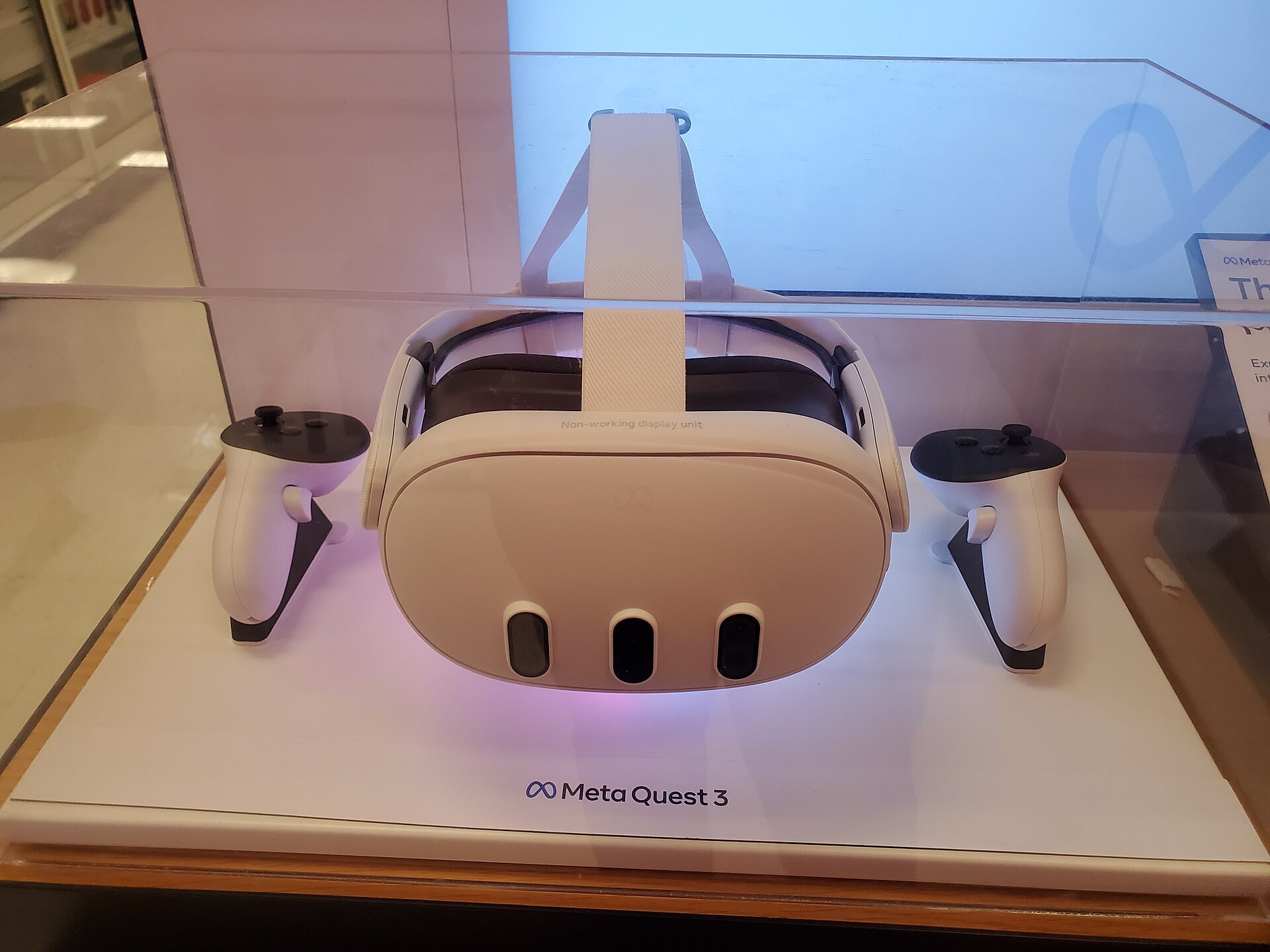
The most common question we get from PS5 owners is whether to buy PS VR2 or a Meta Quest. The two headsets solve different problems. Our Meta Quest 3 guide for buyers and first time owners covers Meta’s headset in depth, but here’s the core comparison.
| Spec | PS VR2 | Meta Quest 3 |
|---|---|---|
| US price | $399.99 | $499.99 (512 GB) |
| Type | Tethered to PS5 | Standalone, optional PC link |
| Display | OLED, HDR | LCD |
| Resolution per eye | 2000 x 2040 | 2064 x 2208 |
| Lenses | Fresnel | Pancake |
| Eye tracking | Yes | No |
| Passthrough | Grayscale | Full colour, mixed reality |
| Wireless | No | Yes |
| Weight | About 560 g | About 515 g |
| Battery | None needed (powered by cable) | Roughly 2 to 2.5 hours |
Picture quality
PS VR2 wins on contrast and colour depth thanks to OLED and HDR. The Quest 3 wins on clarity across the whole lens, because its pancake lenses have a much larger sweet spot.
Freedom
The Quest 3 is wireless and portable. You can play in any room or take it on holiday. PS VR2 stays tied to your PS5.
Games
PS VR2 has the Sony exclusives and the Gran Turismo and Resident Evil VR modes. The Quest has the largest standalone VR library, plus mixed reality apps. With the PC adapter, PS VR2 can also access SteamVR, which the Quest can do over a link too.
Mixed reality
Quest 3 is far ahead here. Its colour passthrough supports genuine mixed reality games and apps. PS VR2 has no real mixed reality support. If spatial computing interests you, Apple Vision Pro sits at the far premium end, and Meta Quest 4 rumors are worth tracking for what comes next.
How PS VR2 has been received
Sony’s own product page quotes a 5/5 from The Telegraph and a 4.5/5 from GamesRadar+. Critics broadly praised the OLED display, eye tracking, Sense controllers and comfort. The most common criticisms were the cable, the price at launch and the size of the game library.
The price issue has eased with the cut to $399.99. The library has also grown, though the pace of big first-party releases has slowed.
Sony’s support for the headset
There are fair questions about Sony’s long-term commitment. These are the main data points, graded by source:
- Official: Sony closed London Studio in February 2024. That team had made VR games for the original PlayStation VR.
- Proven reporter: Bloomberg reported in March 2024 that Sony had paused PS VR2 production after building up unsold inventory. Sony did not confirm a pause publicly.
- Official: Sony launched the PC adapter in August 2024 and cut the headset price in March 2025, which indicates the company still wants to sell the hardware.
Our take: buy PS VR2 for the games that exist today, not for a promised wave of new first-party titles. The current library alone justifies the price for many PS5 owners.
Troubleshooting common PS VR2 problems
| Problem | Likely cause | What to try |
|---|---|---|
| Blurry image | Poor fit or lens alignment | Reseat the headband, adjust the visor, turn the lens dial |
| Image blurry in one eye | Eye tracking calibration off | Recalibrate in PS VR2 settings |
| Tracking jumps or drifts | Low light, mirrors, windows | Add light, cover mirrors, clean the camera lenses |
| Controllers not detected | Not paired or battery flat | Charge them, then pair with the USB cable |
| Headset not recognised | Wrong port or old firmware | Use the front USB-C port and update system software |
| Play area keeps resetting | Furniture moved or lighting changed | Rescan the room and redraw the boundary |
| Flicker under room lights | Lighting frequency interference | Switch to different bulbs or play in daylight |
If a problem continues after these fixes, Sony’s PS VR2 support pages list further steps. Hardware faults may be covered by warranty.
Comfort check
Don’t clean the lenses with alcohol or tissues. Use a dry microfibre cloth, and keep the headset out of direct sunlight, which can burn the OLED panels through the lenses.
Who should buy PS VR2
Buy PS VR2 if you already own a PS5, love racing sims or horror games, and want high-contrast visuals. Gran Turismo 7 alone makes a strong case. It’s also a good pick if you want a headset that’s comfortable for long sessions and never needs a battery charge.
Buy a Meta Quest 3 instead if you want wireless play, portability, mixed reality or the largest standalone library. It’s also the better pick if you don’t own a PS5.
Buy both if you’re a dedicated VR player. The libraries overlap less than you might think, and the PC adapter brings Steam into the mix for PS VR2 owners.
Wait if you dislike cables, have very limited room or are particularly prone to motion sickness. Try a demo first in those cases.
FAQ
Is PS VR2 wireless?
No. PS VR2 connects to your PS5 with one USB-C cable. There is no official wireless adapter or wireless mode.
Does PS VR2 work on PS4?
No. PS VR2 only works with PS5 consoles, including the Slim and Pro models. It also works on PC with Sony’s $59.99 adapter.
Can I play original PlayStation VR games on PS VR2?
No. PS VR2 is not backward compatible with original PS VR games. Some developers released PS VR2 versions of their older games, sometimes as discounted upgrades.
How much does PS VR2 cost?
The US list price is $399.99 after Sony’s March 2025 price cut. It launched at $549.99 in February 2023.
What is PSV2?
PSV2 is a common shorthand search for PS VR2, Sony’s second-generation VR headset. It is the same product as the PlayStation VR2 and PSVR2.
Can I wear glasses with PS VR2?
Yes. Most glasses fit, because the visor slides forward to create space. Very wide frames may press on the sides, so check before long sessions.
Do I need a PS5 Pro for PS VR2?
No. Every PS VR2 game runs on the standard PS5 and PS5 Slim. The PS5 Pro adds enhancements in selected games, such as sharper visuals in Gran Turismo 7.
How long do the Sense controllers last on a charge?
Sony doesn’t publish a figure. In our experience it’s roughly four to five hours of continuous play, so charge them after each session.