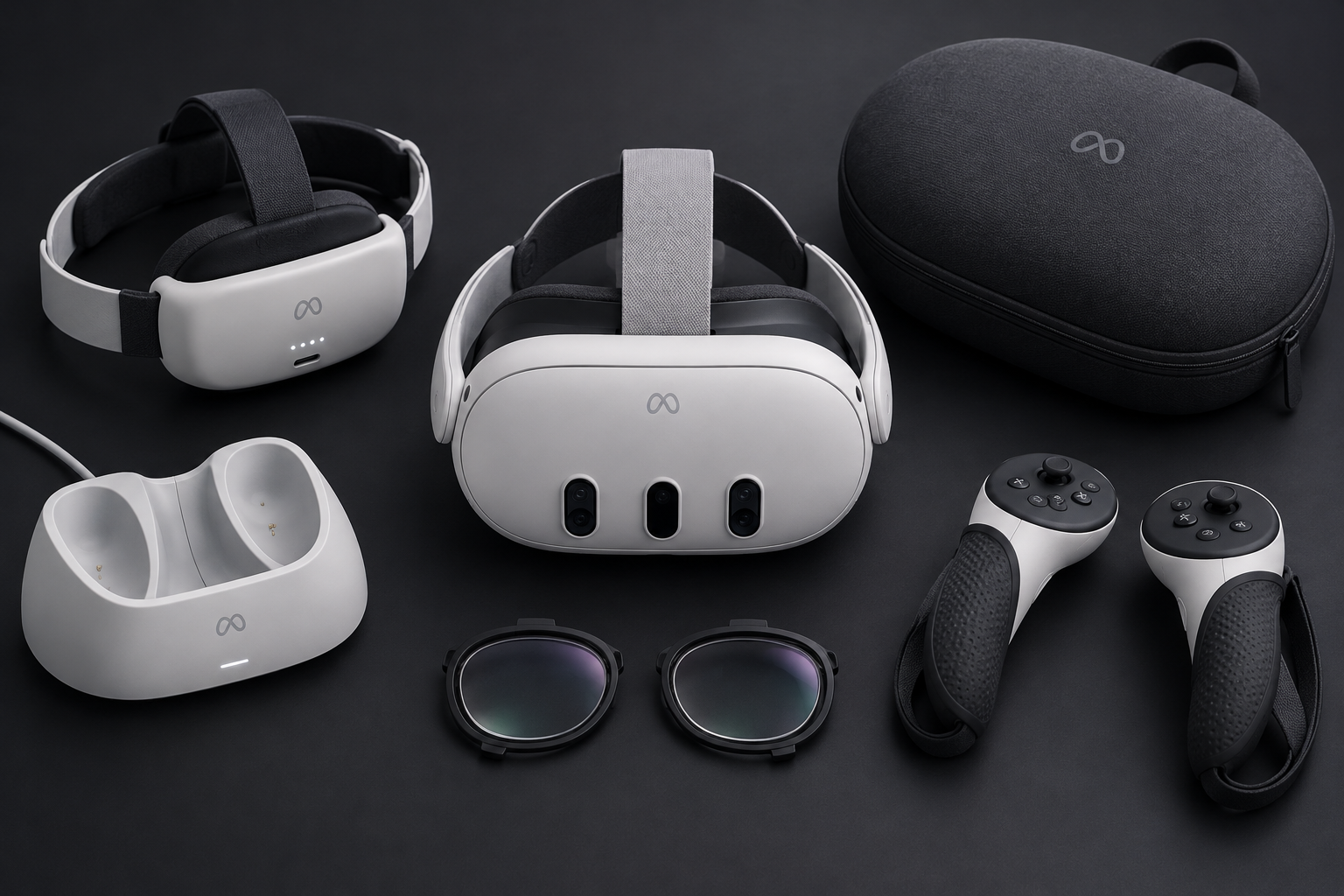
The Meta Quest 3 accessories most worth your money are a better head strap (ideally with a battery), a replacement facial interface, and prescription lenses if you wear glasses. A charging dock, a hard case and good PC VR connectivity come next. Most of the remaining add-ons in Meta’s catalog and on Amazon are optional, and a few are a waste of money.
Why the Quest 3 needs accessories at all
The Quest 3 launched on October 10, 2023, and it is still Meta’s flagship standalone headset. Meta now sells it in a single 512GB version for $499.99. It announced the end of the 128GB model at Meta Connect on September 25, 2024, and phased that model out in late 2024. That money buys excellent pancake lenses, 2064 x 2208 pixels per eye and full-color mixed reality passthrough. The box does not include a comfortable strap or long battery life.
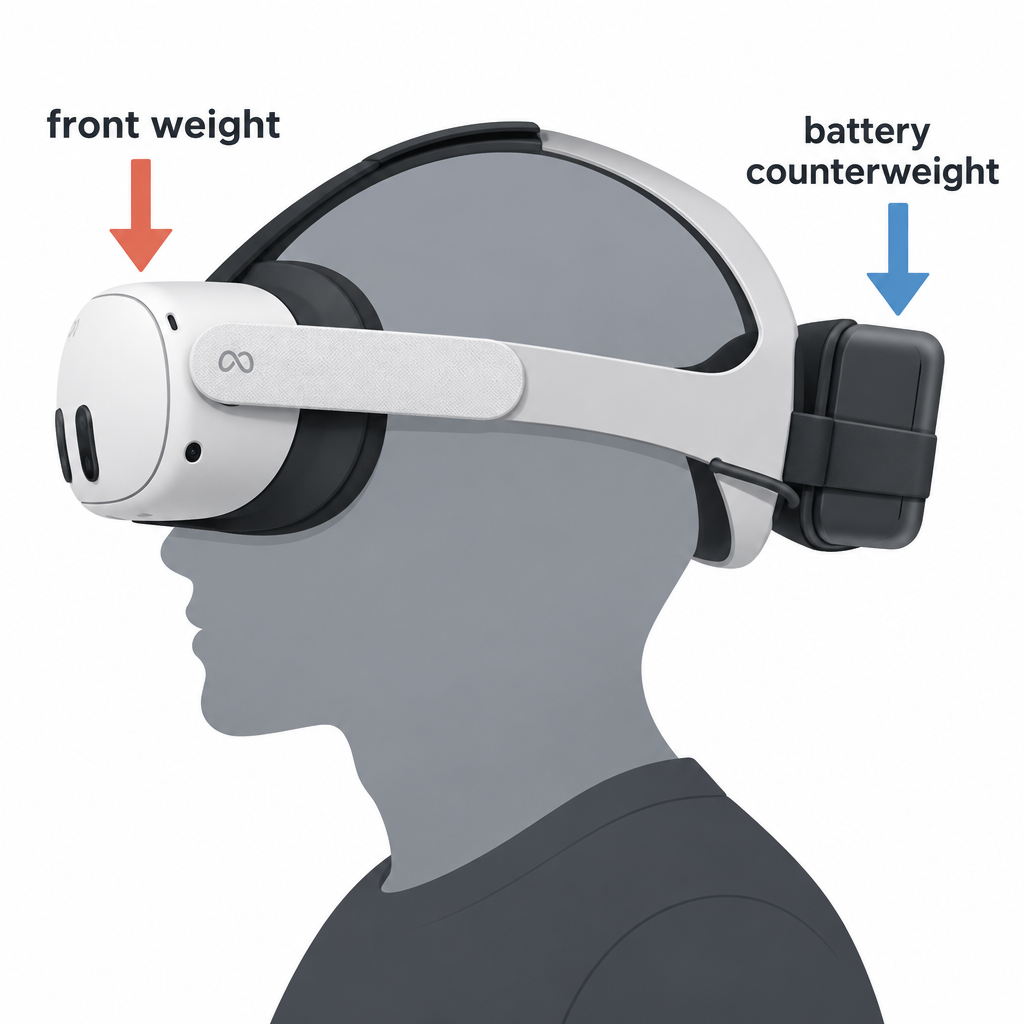
Meta rates the headset at about 2.2 hours of average battery life, and gaming sessions often fall short of that. The included soft fabric strap pulls the 515 g headset onto your face instead of balancing it. In our testing, those two problems set the limit on sessions long before boredom does.
We sort accessories into three groups. Fixes solve a real problem with the stock hardware. Upgrades make good things better. Extras are nice to have and rarely urgent. This guide follows that order.
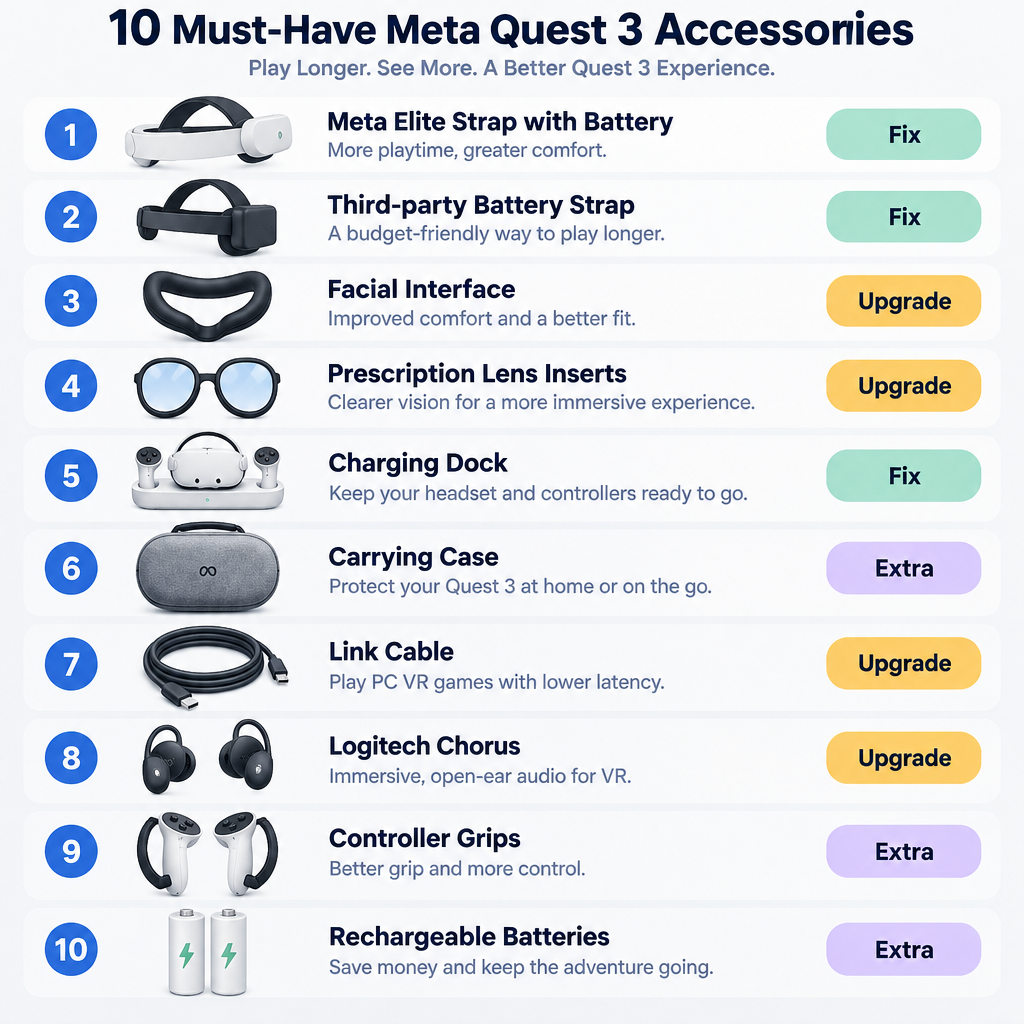
Our 10 picks at a glance
Prices below are Meta’s launch list prices for its own products. Meta changes these often and runs regular sales, so check the Meta Store before buying. Third-party prices vary too much by retailer and week for us to quote a single figure.
| # | Accessory | Category | Price | Who needs it |
|---|---|---|---|---|
| 1 | Meta Elite Strap with Battery | Head strap + battery | $129.99 (launch) | Most owners |
| 2 | Third-party battery strap (BoboVR, Kiwi Design) | Head strap + battery | Varies | Value buyers, long sessions |
| 3 | Replacement facial interface | Comfort / hygiene | Varies | Sweaty players, shared headsets |
| 4 | Prescription lens inserts | Optics | Varies by prescription | Glasses wearers |
| 5 | Meta Quest 3 Charging Dock | Charging | $129.99 (launch) | Daily users |
| 6 | Meta Quest 3 Carrying Case | Storage / travel | $69.99 (launch) | Anyone who moves the headset |
| 7 | Meta Quest Link Cable (16 ft) | PC VR | $79.99 | Wired PC VR players |
| 8 | Logitech Chorus | Audio | $99.99 | Better sound without earbuds |
| 9 | Controller grips / knuckle straps | Controllers | Varies | Active and fitness games |
| 10 | Rechargeable AA batteries | Controllers | Varies | Everyone |
If your budget only covers one item, buy a strap with a battery. It fixes comfort and runtime together.
1. Meta Elite Strap with Battery
Meta’s own premium strap replaces the fabric band with a rigid cradle and a tightening dial at the back. The battery version puts a power pack in the rear, which counterweights the front-heavy headset. It launched at $129.99. The version without a battery launched at $69.99.
The counterweight matters more than the extra charge. A heavier back makes the whole rig feel lighter because the weight stops pressing on your cheeks and forehead. Meta’s listing claims up to about two extra hours of play, which roughly doubles a typical gaming session.
What we like:
- Fits straight onto the Quest 3 arms with no adapters and no warranty doubts.
- The dial lets you take it on and off quickly, which helps when you pass the headset around.
- The battery connects through a short USB-C lead into the headset port.
What we don’t like:
- It costs more than most third-party alternatives.
- The battery is built into the strap, so you can’t swap a fresh pack in mid-session.
Buy it if you want the official option and you rarely play longer than four hours in a row.
2. Third-party battery head straps
Third-party straps are where most of the real innovation happens. BoboVR (the M3 Pro line) and Kiwi Design are the two brands we see recommended most often in the Quest community. They tend to add features Meta’s strap lacks, chiefly hot-swappable magnetic battery packs. With those, you snap a charged pack on and keep playing.
Third-party straps cost less than the Elite Strap with Battery, and some ship with thicker forehead pads or wider rear cradles that suit larger heads. The tradeoff is consistency. Fit, plastic quality and clip tolerances vary between brands and even between production runs, and Meta does not certify any of them.
When you shop, we suggest checking three things:
- The listing names Quest 3 specifically. Quest 2 straps don’t fit the Quest 3 arms.
- The battery connects over USB-C and comes with a short, angled cable that doesn’t stick out at your temple.
- Pads are replaceable. Foam compresses within months of heavy use.
Comfort check
Battery straps get warm against the back of your head during charging. Stop if a pack gets hot to the touch, and never leave third-party batteries charging overnight unattended.
The cheap alternative: a power bank in your pocket
If you mostly play seated or standing, you can skip the battery strap. A slim USB-C power bank in a pocket, connected by a right-angle cable to the headset port, keeps the Quest 3 topped up for hours. The headset charges over USB-C while you play. Pair it with the non-battery Elite Strap or any rigid third-party strap and you get most of the benefit for less money. The downside is a cable running down your neck, which gets in the way in room-scale games.
Battery and play time options compared
This table compares the practical ways to extend a session. Play time figures are Meta’s own claims where Meta makes one. Third-party figures depend on pack capacity and what you’re running, so we don’t quote them.
| Option | Extra play time | Swappable mid-session | Adds counterweight | Cable down your back |
|---|---|---|---|---|
| Stock headset only | Baseline (~2.2 hrs per Meta) | No | No | No |
| Meta Elite Strap with Battery | Up to ~2 hrs (Meta’s claim) | No | Yes | No |
| Third-party magnetic battery strap | Depends on pack size | Yes | Yes | No |
| Pocket power bank + right-angle cable | Depends on power bank | Yes | No | Yes |
| Link cable to a powered PC port | Charges while you play, may only slow drain | N/A | No | Yes (to PC) |
3. A replacement facial interface
The Quest 3 ships with a foam facial interface. It’s comfortable at first. After a few sweaty sessions of Beat Saber, Supernatural or anything else in our “vr games” roundup that gets you moving, foam soaks up sweat and becomes hard to clean.
You have two main replacement types:
| Type | Feel | Cleaning | Best for |
|---|---|---|---|
| Silicone / PU leather | Smooth, slightly warm | Wipe with a cleaning wipe | Shared headsets, fitness |
| Breathable fabric / mesh | Soft, cooler | Remove and wash cover | Long seated sessions |
| Stock foam | Soft, absorbent | Hard to clean properly | Light, solo use |
Meta sells replacement Quest 3 facial interfaces, and brands such as Kiwi Design, AMVR, VR Cover and Globular Cluster make their own versions. Several third-party interfaces also change how far the lenses sit from your eyes. That can widen the field of view a little or make room for glasses, so read the product description carefully.
Player tip
Buy two covers and swap them between sessions. A fresh, dry interface fogs the lenses less and stops the musty smell that builds up in foam.
Light blocking in passthrough
The Quest 3 interface lets light in under the nose and at the sides by design. This keeps you aware of your room during mixed reality. If you mostly play fully immersive games and that light bleed bothers you, some third-party interfaces add a fuller blocking flap. For mixed reality apps, most of the time you’ll want the opening left open.
4. Prescription lens inserts
The Quest 3 does fit many glasses, since the facial interface has an eye relief adjustment for exactly this. Wearing glasses inside a headset still brings real problems. Frames can scratch the lenses, the pads press on your temples, and you lose some field of view.
Magnetic prescription inserts clip onto the Quest 3 lenses and fix all three. Zenni is Meta’s official prescription lens partner for the Quest 3. Other well-known suppliers include VR Wave and Honsvr. Expect to provide your full prescription including pupillary distance. Prices depend on the prescription and add-ons such as blue-light coatings, so we can’t give a fair single figure.
Two practical notes from using them:
- Inserts also act as lens protectors, which keeps the headset’s own optics safe from scratches.
- If several people share the headset, take the inserts out before passing it on. A wrong prescription is a fast route to eye strain and headaches.
Comfort check
If text looks sharp in one eye and blurry in the other, or you get headaches after 15 minutes, recheck your prescription and pupillary distance before blaming the headset.
5. Meta Quest 3 Charging Dock
Meta’s official dock launched at $129.99. It charges the headset through the pogo pins on the Quest 3 and charges both Touch Plus controllers at the same time, which is why it ships with rechargeable controller batteries. Drop the headset in after a session and it’s full the next time you reach for it.
Is it worth $129.99? Only if you play most days. The real gain is habit. A dock gives the headset a home, keeps it off the floor, and means you never start a session at 30%.
Third-party charging stations from brands like Anker cost less and often include a display stand. Look for pogo-pin docks designed specifically for the Quest 3, since Quest 2 docks do not match the pin layout.
Comfort check
Keep any dock out of direct sunlight. Sunlight that hits the Quest 3 lenses can focus onto the displays and permanently burn them.
6. Meta Quest 3 Carrying Case
Meta’s official case launched at $69.99. It’s a hard-shell case shaped for the Quest 3 with room for the controllers and the charger. A hard case protects the lenses and passthrough cameras, and those are the parts that are hardest and most expensive to repair.
The important question is strap compatibility. Many cases built for the stock fabric strap won’t close around a rigid Elite Strap or a bulky third-party battery strap. Buy your strap first, then a case that lists that strap as compatible. Several third-party makers sell larger cases sized for Elite-style straps.
If the headset never leaves your living room, a case is optional. If it goes in a car, a backpack or to a friend’s house, it’s essential.
7. PC VR: Link cable, or a better router
The Quest 3 doubles as a PC VR headset for SteamVR games such as Half-Life: Alyx. You have three main ways to connect, and only one of them needs a cable.
| Method | Cost | Connection | Notes |
|---|---|---|---|
| Meta Quest Link Cable (16 ft) | $79.99 | USB-C, wired | Most consistent image, also charges |
| Third-party USB 3 USB-C cable | Varies | Wired | Must support USB 3 data speeds |
| Air Link | Free | Wi-Fi | Built into Meta’s PC app |
| Steam Link for Quest | Free | Wi-Fi | Valve’s app, launched December 2023 |
| Virtual Desktop | Paid app | Wi-Fi | Popular, highly configurable |
Meta’s official Link Cable is 16 feet long and expensive for what it is. A good third-party USB 3 USB-C cable of similar length works the same for most people. Avoid the cheapest no-name cables. Many only support USB 2 speeds, which causes compression artifacts and stutter.
For wireless PC VR, the accessory that matters is your router. The Quest 3 supports Wi-Fi 6E. A Wi-Fi 6 or 6E router in the same room as your play space, with the PC wired to it by Ethernet, beats any cable for freedom of movement. We consider this the most underrated Quest 3 upgrade, even though it never shows up on accessory store pages.
Comfort check
A cable is a trip hazard in room-scale games. Route it overhead with retractable clips, or stick to seated and standing play when wired.
8. Audio upgrades
The Quest 3’s built-in speakers in the strap arms are louder and fuller than the Quest 2’s. They still leak sound to everyone else in the room and lack bass.
Logitech Chorus ($99.99) is the off-ear option we recommend first. It mounts to the strap arms and sits just off your ears, so you keep awareness of your room and avoid sweaty ear cups. It plugs in over USB-C. Check that the model you buy lists Quest 3 support, and confirm it fits your chosen strap.
The cheaper route is the 3.5mm headphone jack on the Quest 3. Short-cable earbuds work well because they don’t flap around during active play. Bluetooth headphones are a poor fit for gaming on Quest 3 because of the lag.
9. Controller grips and knuckle straps
The Quest 3 Touch Plus controllers drop the tracking rings of earlier Quest controllers, which makes them more compact. The stock wrist lanyards keep them from flying into your TV, but they don’t let you open your hand fully.
Knuckle-style grips from AMVR, Kiwi Design and others wrap over the back of your hand. You can let go of the controller completely, which feels natural in climbing, boxing and throwing games. Most of these grips also add a battery door that opens without removing the grip.
Fitness players should treat grips as essential. Seated players can skip them.
10. Rechargeable AA batteries
Each Touch Plus controller runs on a single AA battery. Disposables add up fast, and controller batteries always run out mid-match. A set of four rechargeable AAs with a small charger costs very little and pays for itself quickly.
If you buy Meta’s Charging Dock, it includes rechargeable controller batteries, so you can skip this item.
What about the Quest 3S?
Meta’s Quest 3S launched on October 15, 2024, at $299.99 (128GB) and $399.99 (256GB). It shares the Quest 3’s processor, controllers and mixed reality features. It uses different lenses and a different front shell, and accessory compatibility follows from that.
| Accessory | Quest 3 | Quest 3S |
|---|---|---|
| Touch Plus grips, AA batteries | Yes | Yes (same controllers) |
| Link cable / Wi-Fi PC VR | Yes | Yes |
| Facial interfaces | Quest 3 versions | Need 3S-specific versions |
| Cases | Quest 3 shaped | Check listing; shells differ |
| Head straps | Quest 3 versions | Check listing for 3S support |
| Charging docks | Quest 3 versions | Check listing for 3S support |
Many products now say “Quest 3/3S”, which helps. When a listing names only one headset, assume it fits only that one.
Accessories we’d skip
Not every product in the Meta Quest accessory aisle earns its price.
- Cheap USB 2 “Link” cables. They often work at first, then give poor image quality and dropped connections.
- Generic universal VR cases. They rarely fit a Quest 3 with an upgraded strap, and loose fits let the headset rattle.
- Novelty lens covers without a magnetic mount. They smudge the lenses more than they protect them.
- Vague “comfort kits” from unknown sellers. Usually a handful of foam pads you can buy individually from reputable brands.
Warranty and safety basics
Meta’s limited warranty does not cover damage caused by third-party products. That matters most for anything that connects electrically: battery straps, power banks and pogo-pin docks. Buy those from established brands with clear return policies, and keep your receipts.
Battery straps put a lithium cell against your head, so treat them like any other battery. Don’t use packs that swell, smell or get hot, and don’t crush them in a tight bag. Room-scale safety matters too. Accessories that add cables or weight change how you move, so redraw your Guardian boundary after any big change to your setup.
Building a sensible Quest 3 kit by budget
Our suggested order of purchases, starting with what fixes the most:
- Under a modest budget: a rigid third-party strap, rechargeable AAs and a washable facial interface.
- Mid budget: add a battery strap (official or third-party) and a hard case sized for that strap.
- Full kit: add prescription inserts if you need them, a charging dock, Logitech Chorus and a Wi-Fi 6E router for PC VR.
Buy the strap first. Your strap choice decides which case fits, whether a dock still makes sense, and which audio options mount properly.
FAQ
What is the single best Meta Quest 3 accessory?
A head strap with a built-in or swappable battery. It moves weight off your face, balances the headset and extends play time, which fixes the two biggest complaints about the stock Quest 3.
Do Quest 2 accessories work with the Quest 3?
Mostly not. Straps, facial interfaces, cases and docks are shaped for each headset, so Quest 2 versions don’t fit. USB-C cables and earbuds carry over. The Quest 2 controllers also differ from the Quest 3’s Touch Plus controllers, so grips aren’t interchangeable.
Is Meta’s Elite Strap with Battery worth it over third-party straps?
It’s worth it if you value guaranteed fit and warranty peace of mind. Third-party straps from BoboVR and Kiwi Design cost less and often add hot-swappable batteries, which suits people who play for many hours at a time.
Can I wear glasses with the Meta Quest 3?
Yes. The Quest 3 has an eye relief adjustment that makes room for many frames. Prescription lens inserts are more comfortable over long sessions and protect the headset lenses from scratches.
Do I need a Link cable to play PC VR on Quest 3?
No. Air Link and Steam Link are free and run over Wi-Fi, and Virtual Desktop is a popular paid option. A cable gives the most consistent image. A strong Wi-Fi 6 or 6E router near your play space gives you more freedom to move.
Are Quest 3 accessories compatible with the Quest 3S?
Controller accessories and PC VR connections carry over because both headsets share the same controllers and ports. Facial interfaces don’t carry over, and straps, cases and docks need explicit Quest 3S support on the listing.