A VR headset is a head-mounted display that places a small screen in front of each eye, magnifies it through lenses, and tracks your head movement so the image updates as you look around. The result is a 3D world that appears to surround you. Below we explain every part that makes that illusion work, the main types of headset you can buy, and which current models we would actually spend money on.
What is a VR headset, exactly?
A virtual reality headset (also written as v r headset, VR head-mounted display or HMD) has one job. It replaces what your eyes see with a computer-generated scene, then keeps that scene locked in place while your head moves. When that works, your brain accepts the virtual room as a real space, a feeling the industry calls “presence.”
Three things have to happen together for presence to kick in:
- Each eye sees a slightly different image. That gives you depth, the same way your two eyes do in real life.
- The image fills most of your vision. A headset with a narrow view feels like looking through binoculars.
- The picture reacts to your head instantly. Turn your head and the world must stay put. Any lag breaks the illusion and can make you feel ill.
You will see a lot of overlapping names for these devices. “VR helmets” is an older term from arcade and military simulators, when headsets really were bulky helmets. “Virtual headset” and “VR glasses” get used loosely in shopping listings. Apple calls its Vision Pro a “spatial computer,” Samsung and Google talk about “XR,” and Meta now leans on “mixed reality.” Under the marketing, all of them are the same basic device: displays plus lenses plus tracking.
VR, AR, MR and XR in one paragraph
Virtual reality (VR) blocks out the real world entirely. Augmented reality (AR) draws digital objects on top of the real world, usually through transparent glasses. Mixed reality (MR) is the version most modern headsets do: cameras on the front film your room, the headset shows you that video feed, and virtual objects get placed into it so they can sit on your real desk or bounce off your real walls. Extended reality (XR) is the umbrella term covering all three. A Meta Quest 3 does VR and MR. A pair of display smart glasses does a limited form of AR.
What a VR headset looks like
A lot of people search for a picture of a VR headset before buying, so here is a plain description of the hardware you are imagining.
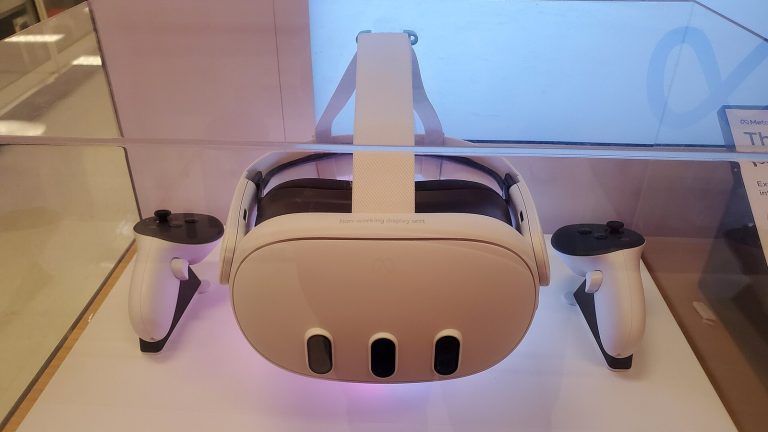
From the front, most current headsets look like an oversized pair of ski goggles. The front panel (sometimes called the visor) houses the displays, the processor on standalone models, and a cluster of cameras. On a Quest 3 you can see three vertical pill-shaped sensor areas. Apple’s Vision Pro hides its cameras behind a curved glass front that can show a rendering of your eyes to people around you, a feature Apple calls EyeSight.
Inside, you see two round or slightly squared lenses, a soft foam or fabric facial interface that rests on your cheeks and forehead, and a small proximity sensor that wakes the display when you put it on. A strap wraps around the back of your head, and better designs add a top strap to take weight off your face. Some headsets have a slot or wheel to adjust the distance between the lenses.
Most come with two handheld controllers. Older Quest controllers had a plastic tracking ring looping over your knuckles. The Quest 3 controllers dropped the ring, and PS VR2’s Sense controllers wrap a tracking band around the back of your hand instead. Vision Pro and Galaxy XR ship without controllers at all and rely on your hands and eyes.
How a VR headset works
Every headset, from a Quest 3S starting at $349.99 to a $3,699 Vision Pro, uses the same set of building blocks. The differences in price come from how good each block is.
| Component | What it does | Typical example in 2026 |
|---|---|---|
| Displays | Show a separate image to each eye | LCD (Quest 3), OLED (PS VR2), micro-OLED (Vision Pro, Galaxy XR) |
| Lenses | Bend and magnify the image so it fills your vision | Fresnel (Quest 3S), pancake (Quest 3, Vision Pro) |
| Tracking cameras and IMU | Work out where your head is and which way it faces | Inside-out cameras plus gyroscope and accelerometer |
| Controllers or hand tracking | Put your hands into the virtual world | Quest Touch Plus, PS VR2 Sense, camera-based hand tracking |
| Eye tracking (on some models) | Watches where you look for input and rendering savings | PS VR2, Vision Pro, Galaxy XR |
| Processor | Renders the scene, either on the headset or on a PC or console | Snapdragon XR2 Gen 2, Apple M5, PS5, a gaming PC |
| Audio | Spatial sound that seems to come from points in space | Speakers in the strap, or headphone jack or Bluetooth |
Displays: two screens, one image per eye
The headset either uses two separate panels (one per eye) or one panel split down the middle. Each half gets its own image, rendered from a slightly different camera position, just like your left and right eyes see the world from slightly different spots. Your brain fuses the two into a single 3D view.
The display type shapes the experience a lot:
- LCD panels are cheaper and get very bright, but blacks look dark grey. The Quest 3 and Quest 3S both use LCDs.
- OLED panels switch individual pixels fully off, so a night sky in a horror game looks genuinely black. PS VR2 uses OLED, and dark scenes on it look noticeably better than on a Quest.
- Micro-OLED packs a huge number of pixels onto a tiny silicon chip. This is how Apple Vision Pro and Samsung Galaxy XR reach their very sharp images. It is also expensive, which is a big part of why those headsets cost what they do.
Refresh rate matters as much as resolution. A headset typically runs between 72Hz and 120Hz, meaning the image is redrawn 72 to 120 times per second. Lower rates can produce visible flicker for some people and make fast movement smear. Quest 3 supports up to 120Hz, PS VR2 runs at 90Hz or 120Hz depending on the game.
Lenses: why the screens look huge
The displays sit only a few centimetres from your eyes. Without help, your eyes could not focus on something that close. The lenses bend the light so the image appears to sit a comfortable distance away (roughly one to two metres for most designs) and stretch it across a wide field of view.
There are two main lens types on shelves now:
- Fresnel lenses use concentric ridges to keep the lens thin and light. They are cheap, but you see “god rays” (light streaks around bright objects on dark backgrounds), and the sharp area in the centre is small. The Quest 3S uses Fresnel lenses, as did the Quest 2.
- Pancake lenses fold the light path between several layers, which lets the screen sit closer to your face. Headsets get slimmer and the image stays sharp nearly edge to edge. The trade-off is that pancake lenses lose a lot of light, so the displays have to be brighter. Quest 3, Vision Pro, Galaxy XR and Bigscreen Beyond 2 all use pancake optics.
When we moved from a Quest 3S to a Quest 3 on the same game, the biggest single upgrade was the lens, not the screen. Text near the edge of your view becomes readable instead of blurry.
Interpupillary distance (IPD)
Everyone’s eyes are a slightly different distance apart, usually somewhere in the high 50s to low 70s in millimetres. If the lens centres don’t line up with your pupils, the image looks blurry and you get eye strain faster. Headsets handle this in different ways:
- Quest 3 has a wheel that slides the lenses continuously between 53mm and 75mm.
- Quest 3S has three fixed lens positions (58mm, 63mm and 68mm).
- PS VR2 has a dial on top, and the setup software shows you when your eyes are centred.
- Vision Pro and Galaxy XR adjust automatically using eye tracking.
If you have no idea what your IPD is, an optician can measure it, or several phone apps estimate it with the front camera.
Head tracking: 3DoF vs 6DoF
Tracking is the part that makes a VR headset feel like a place instead of a screen strapped to your face. There are two levels:
- 3DoF (three degrees of freedom) tracks rotation only: looking up and down, left and right, and tilting your head. Old phone-based headsets and some media viewers worked this way. You cannot lean in or walk around.
- 6DoF (six degrees of freedom) adds position: moving forward and back, up and down, side to side. Every serious headset sold today is 6DoF.
Two approaches deliver 6DoF.
Inside-out tracking puts cameras on the headset itself. The cameras watch your room, find features like table edges and picture frames, and use a technique called SLAM (simultaneous localisation and mapping) to work out where the headset is relative to them. An IMU (inertial measurement unit, a gyroscope plus accelerometer) fills the gaps between camera frames, updating hundreds or thousands of times per second. Quest, PS VR2, Vision Pro and Galaxy XR all use inside-out tracking. It needs no extra hardware, which is why setup takes minutes.
Outside-in tracking puts sensors in the room. Valve’s SteamVR Lighthouse system uses small boxes called base stations that sweep the room with invisible lasers; sensors on the headset and controllers time those sweeps to calculate their exact position. It is extremely accurate and never loses track of controllers behind your back. It is also more hardware to buy and mount. The Valve Index uses Lighthouse, and the ultralight Bigscreen Beyond 2 needs base stations because it has no cameras of its own.
Inside-out tracking struggles in very dark rooms, in rooms with plain white walls, and with mirrors. If your headset keeps losing tracking, more light and a few objects in view usually fix it.
Controllers, hand tracking and eye tracking
Controllers on inside-out headsets carry infrared LEDs that the headset cameras can see, plus their own IMUs. That combination tells the headset where your hands are. Thumbsticks and buttons handle movement and menus, and grip triggers let you pick things up. PS VR2’s Sense controllers add adaptive triggers and finger-touch detection, which is why reloading a gun in a PS5 shooter feels so physical.
Hand tracking skips the controllers. The headset cameras recognise your hands and fingers and turn pinches and grabs into input. On Quest it works well for menus, media and some games. Vision Pro and Galaxy XR are built around it: you look at a button and pinch your fingers to click.
Eye tracking uses small infrared cameras inside the headset pointed at your eyes. It has three uses:
- Input. You select things by looking at them.
- Foveated rendering. Your eyes only see fine detail in a tiny central area. If the headset knows where you are looking, it can render that spot at full quality and the rest at lower quality, saving a lot of processing power. PS VR2 relies on this to make PS5 games look as good as they do.
- Social expression. Avatars can make eye contact and blink. Apps like VRChat have moved in this direction, and VRChat native face tracking for avatars in its open beta is a good example of where social VR is heading.
Latency, refresh and reprojection
The time between you moving your head and the image updating is called motion-to-photon latency. The industry target for comfortable VR has long been under about 20 milliseconds. Above that, the world seems to swim slightly behind your head, and that mismatch is one of the main triggers of motion sickness.
Headsets use a trick called reprojection (Meta calls its versions Asynchronous TimeWarp and Asynchronous SpaceWarp) to cover gaps. If a game misses a frame, the headset takes the last image and warps it to match your newest head position. You might see some wobble around moving objects, but your view stays locked to your head, which is what your stomach cares about.
Passthrough and mixed reality
Passthrough means the outward cameras show you your real surroundings inside the headset. Early versions were grainy black and white. The Quest 3 and Quest 3S show colour passthrough that is good enough to read a phone screen or find your coffee. Vision Pro’s passthrough is the best we have used, though it still blurs slightly on fast motion.
Good passthrough turns a VR headset into a mixed reality device. Games can spawn enemies that climb through your actual walls, and you can pin virtual monitors above your real desk. A depth sensor (Quest 3 has one, Quest 3S does not) helps the headset understand room geometry so virtual objects sit correctly on surfaces.
Where the computing happens
Something has to draw all those frames, and that decides what kind of headset you own.
- Standalone headsets have a mobile chip inside. Quest 3 and Quest 3S use Qualcomm’s Snapdragon XR2 Gen 2 with 8GB of memory. No wires, no PC.
- Tethered headsets send the job to a PC or console. PS VR2 plugs into a PS5 with one USB-C cable. PC VR headsets connect to a gaming PC, often via DisplayPort and USB, or stream wirelessly.
- Hybrid setups are now normal. A Quest can run its own games and also stream PC VR games over Wi-Fi or a USB cable using Air Link, Steam Link or Virtual Desktop.
Standalone chips are far weaker than a gaming PC, so standalone versions of the same game typically have simpler lighting and lower-resolution textures. That is the core trade-off: freedom versus fidelity.
Types of VR headsets you can buy
| Type | How it runs | Examples | Price range (launch/current) | Who it suits |
|---|---|---|---|---|
| Standalone | Built-in chip and battery | Meta Quest 3, Quest 3S | $299 to $499 | Most first-time buyers |
| Console | Tethered to PS5 | PlayStation VR2 | $399.99 | PS5 owners |
| PC VR | Tethered or streamed from a gaming PC | Bigscreen Beyond 2, Valve Index | About $1,000 and up | Enthusiasts, sim racers, flight sim fans |
| Spatial computer | Powerful built-in chip, eye and hand input | Apple Vision Pro, Samsung Galaxy XR | $1,799 to $3,499 | Media, productivity, early adopters |
| Phone-based | Phone slotted into a viewer | Google Cardboard, Gear VR | Discontinued | Nobody in 2026 |
Standalone headsets
These are the default choice and outsell everything else. The Quest line dominates, and its store has the largest catalogue of native VR games. You charge it, put it on, draw a play boundary, and you are in. Most Quest headsets are sold through the Meta Store and big retailers like Best Buy and Amazon in the United States, Canada and much of Europe.
Console VR
PlayStation VR2 is the only current console headset. It launched in February 2023 at $549.99 and dropped to $399.99 in March 2025. It needs a PS5 and has no battery or onboard chip, so it is only as good as the console behind it. For a deeper look at what you get, our PS VR 2 explainer for PS5 owners covers the game library and setup. Sony also sells a $59.99 adapter that lets PS VR2 work with SteamVR on a PC, minus some features like haptics in the headset and HDR.
PC VR headsets
PC VR gets you the best graphics and the most demanding software: Microsoft Flight Simulator, racing sims, and heavily modded games. You need a capable gaming PC, and the headsets themselves range from budget to boutique. Valve has also announced the Steam Frame, a standalone-capable headset built around streaming games from a PC, alongside its new Steam Machine living-room PC. Valve gave an early-2026 launch window without a price at announcement, so treat any specs you see as Valve’s own claims until reviews land. If you are curious how the two fit together, our piece on what the Steam Machine means for VR headset owners breaks it down.
Spatial computers
Apple Vision Pro and Samsung’s Galaxy XR (the first headset on Google’s Android XR platform) are less about games and more about screens: giant virtual monitors, 3D movies, immersive video and apps floating in your room. Both have outstanding micro-OLED displays, eye tracking and hand tracking. Our guide to Vision Pro and how spatial computing works explains what Apple is going for. For gaming, both have smaller libraries than Quest.
Phone-based viewers are dead
If you find a cheap plastic “VR headset” for phones in a bargain bin, skip it. Google discontinued Daydream, Samsung stopped Gear VR, and Cardboard is now an open-source curiosity. These viewers only tracked rotation, had poor lenses, and made many people feel sick. A used Quest 2 or a new Quest 3S is a better first step.
XR headsets vs. smart glasses
Smart glasses are the other half of the head-worn market, and they are often confused with VR headsets. They are a very different device.
A VR or MR headset blocks your view and replaces it. Smart glasses let you see the real world directly through clear lenses and add a small amount of information on top, if they have a display at all. Ray-Ban Meta glasses, for instance, have cameras, speakers and an AI assistant but no display in the standard version. Display glasses like Even Realities’ G2 project a small heads-up readout for notifications, navigation and translation, and the Even G2 brown tortoiseshell frames look like regular optical glasses on your face.
There is also a category of “video glasses” from brands like Xreal and Viture that plug into a phone, laptop or Steam Deck and show a large virtual screen. They are great for watching media on a plane. They are not VR: most only track head rotation (or not at all), the field of view is small, and you cannot walk around inside a game.
| VR / MR headset | Video glasses | Smart glasses | |
|---|---|---|---|
| View of real world | Cameras (passthrough) or none | Through tinted lenses | Direct, clear lenses |
| Field of view | About 90 to 110 degrees | Roughly 45 to 57 degrees | Small or no display |
| Tracking | Full 6DoF | None to 3DoF on most | Minimal |
| Main use | Games, fitness, MR apps | Movies, gaming on a big virtual screen | Notifications, camera, AI |
| Wear time | 1 to 3 hours | Several hours | All day |
The best VR headsets in 2026: our picks
These are the headsets we would point a friend toward right now, based on time spent in them. Prices are US launch or list prices at time of writing; retailers run sales often, so check before you buy.
| Headset | Released | Resolution per eye | Refresh rate | Field of view | Weight | Battery | Price |
|---|---|---|---|---|---|---|---|
| Meta Quest 3 (512GB) | Oct 2023 | 2064 x 2208 (LCD) | 72 to 120Hz | 110° H, 96° V | 515g | About 2.2 hrs | $499 |
| Meta Quest 3S | Oct 2024 | 1832 x 1920 (LCD) | 72 to 120Hz | 96° H, 90° V | 514g | About 2.5 hrs | From $299 |
| PlayStation VR2 | Feb 2023 | 2000 x 2040 (OLED) | 90 / 120Hz | About 110° | About 560g | Powered by PS5 | $399.99 |
| Apple Vision Pro (M5) | Oct 2025 | About 23M pixels total (micro-OLED) | Up to 120Hz | Not officially listed | 750 to 800g | About 2.5 hrs | From $3,499 |
| Samsung Galaxy XR | Oct 2025 | 3552 x 3840 (micro-OLED) | Up to 90Hz | 109° H, 100° V | 545g (plus 302g battery) | About 2 hrs | $1,799 |
| Bigscreen Beyond 2 | 2025 | 2560 x 2560 (micro-OLED) | 75 / 90Hz | About 116° diagonal | 107g | Powered by PC | $1,019 |
Best standalone VR headset: Meta Quest 3
The Quest 3 is the headset we use most. Pancake lenses keep the image sharp across the view, the colour passthrough is good enough for real mixed reality, and the depth sensor helps virtual objects sit properly in your room. It plays the full Quest library and streams PC VR well. The stock strap is the weak point; a better strap is the first upgrade on our list of Meta Quest 3 accessories.
Best affordable VR headset: Meta Quest 3S
The Quest 3S runs the same chip and the same games as the Quest 3 for $200 less. You give up the pancake lenses (it uses Fresnel), the depth sensor and some resolution. For a first headset, a kid’s headset, or a fitness-only device, it is the smart buy. Nothing else at this price comes close in game library.
Best for PS5 gamers: PlayStation VR2
If you own a PS5, PS VR2 at $399.99 is the best value high-end experience you can get. OLED contrast, eye-tracked foveated rendering and the Sense controllers make games like Gran Turismo 7 and Horizon Call of the Mountain look excellent. The library is smaller than Quest’s, and the cable means you won’t forget you are tethered.
Most advanced headset: Apple Vision Pro
Vision Pro has the best displays, the best passthrough and the slickest eye-and-hand interface we have used. The M5 refresh in October 2025 added a faster chip, up to 120Hz, longer battery and a more comfortable Dual Knit Band. At $3,499 and heavy on the face, it is a media and productivity machine for people already deep in Apple’s ecosystem. It is not a gaming headset.
Best Android alternative: Samsung Galaxy XR
Galaxy XR delivers a Vision Pro style experience for about half the price. It runs Android XR with Google apps and Gemini built in, and supports optional controllers. The external battery pack and a still-young app store hold it back, but it is the most interesting new platform in years.
Best for PC VR enthusiasts: Bigscreen Beyond 2
At 107g, the Beyond 2 barely feels like you are wearing anything. It is custom-fitted to your face from a phone scan and has razor-sharp micro-OLED screens. It needs a strong gaming PC and SteamVR base stations bought separately, so it is a deliberate choice for people who already play long sessions in VRChat or sims.
Which specs actually matter (and which don’t)
Spec sheets are full of numbers, and most buyers fixate on resolution. Here is how we weigh them after years of wearing these things.
| Spec | What to look for | Why it matters |
|---|---|---|
| Pixels per degree (PPD) | 20+ is decent, 25+ is sharp | Better than raw resolution at predicting clarity |
| Lens type | Pancake beats Fresnel | Edge-to-edge sharpness, slimmer headset |
| Refresh rate | 90Hz minimum, 120Hz ideal | Smoother motion, less flicker |
| Field of view | 100° horizontal or more | Less “binocular” feel |
| Weight and balance | Under 550g, weight spread to the back | Comfort for sessions over an hour |
| Battery (standalone) | 2+ hours | Most sessions, though a battery strap helps |
| Storage | 128GB minimum; more if you install big games | Some games top 10GB to 20GB |
| IPD range | Should cover your measurement | Avoids blur and eye strain |
Pixels per degree beats resolution
Resolution tells you how many pixels a display has. It doesn’t tell you how many land in each degree of your vision, because a wider field of view spreads the same pixels thinner. Pixels per degree (PPD) is the better measure. Meta says the Quest 3 reaches about 25 PPD at the centre, a big jump from the Quest 2’s roughly 20. Normal human vision resolves around 60 PPD, which is why even the best headsets still look a little softer than reality.
Weight is only half the comfort story
A 515g Quest 3 can feel heavier than a 560g PS VR2 because of where that weight sits. Front-heavy headsets press on your cheeks and pull down on your forehead. A strap with a rear counterweight or battery evens things out, which is why so many people swap the stock strap within a week.
Memory and storage
Standalone headsets typically have 8GB to 16GB of RAM, shared between the system, passthrough and the game. You don’t control that, so storage is the spec to choose. Quest 3S comes in 128GB and 256GB versions; Quest 3 now comes only in 512GB. If you plan to keep 20 or more games installed, buy the bigger version.
Comfort, motion sickness and safety
Most people feel fine in VR within a few sessions. Some don’t, and you should know why before you buy.
Comfort check
Smooth joystick movement causes motion sickness in many new players. Stop at the first sign of nausea, sweating or headache, and don’t push through it.
Why VR can make you feel sick
Motion sickness in VR is mostly sensory conflict. Your eyes report movement while your inner ear reports sitting still. The worst triggers are smooth artificial locomotion (gliding with the thumbstick), artificial turning, low frame rates and acceleration you didn’t cause.
Practical ways to reduce it:
- Start with teleport movement and “snap” turning, both standard options in most games.
- Play seated or standing games first: Beat Saber, Walkabout Mini Golf and puzzle games are gentle.
- Turn on comfort vignettes, which darken the edges of your view during movement.
- Keep sessions to 15 to 20 minutes at first, and stop before you feel bad.
- Point a fan at yourself. Many players swear by the airflow cue.
Our guide to VR games worth your time in every genre lists comfort ratings, so you can pick gentle titles while you build up tolerance.
Eye strain and the focus problem
Every current headset displays its image at a fixed focal distance, even when an object appears to be right in front of your nose. Your eyes converge (point inward) on the close object but focus at the fixed distance. This is called the vergence-accommodation conflict, and it is why holding a virtual object very close to your face can feel uncomfortable. Take regular breaks, and don’t read tiny text held at virtual arm’s length for long.
Glasses wearers
Most headsets fit glasses, but frames can scratch the lenses and fog up. Quest 3 and 3S include a spacer or depth adjustment for glasses. A better option is prescription lens inserts that clip onto the headset lenses; they are sold for most popular headsets, and Vision Pro requires Apple’s Zeiss inserts if you need correction.
Play space and physical safety
Every headset lets you draw a boundary (Meta calls it Boundary, formerly Guardian) that appears when you get close to the edge. Respect it. We have all punched a wall or a ceiling light at some point.
- Clear a space of at least 2m x 2m for room-scale games, or play seated.
- Move pets and small children out of the area.
- Never leave the headset in direct sunlight. The lenses act like a magnifying glass and can burn the displays in seconds.
- Watch cables on tethered headsets; it is easy to wrap yourself up while turning.
Age limits
Meta allows children aged 10 and up on Quest with parent-managed accounts. Sony says PS VR2 is not for children under 12, and Apple says Vision Pro is meant for users 13 and older. Kids’ eyes and judgment of space are still developing, so short, supervised sessions make sense even above those ages.
Player tip
Wipe the lenses only with a dry microfibre cloth. Lens cleaner, alcohol and tissue paper can strip coatings and leave permanent scratches.
Setting up your first VR headset
Setup varies by model, but on a standalone Quest the process takes about 15 minutes, and the shape is similar on other headsets.
Quick steps: set up a standalone VR headset
- Charge the headset fully before first use.
- Install the companion app on your phone and sign in.
- Put on the headset, adjust the strap and IPD.
- Connect to Wi-Fi and accept the system update.
- Pair the controllers when prompted.
- Draw your play boundary around clear floor space.
- Install a gentle first game and keep sessions short.
Fit before anything else
Most blurry-image complaints are fit problems, not display problems. Tighten the back strap so the headset sits snugly, then move it up and down on your face until text in the middle of a menu looks sharpest. Adjust the IPD setting until both eyes see a clear image. Only then judge the picture.
Update, then explore
New headsets ship with older software, so the first update can take a while. Let it finish. After that, the Quest’s built-in “First Steps” tutorial, PS VR2’s setup demo and Vision Pro’s guided onboarding are each worth doing; they teach controls in a low-pressure way.
Account and purchase details
A Quest needs a Meta account, a PS VR2 needs your PlayStation account, and Vision Pro uses your Apple ID. Games you buy are tied to that account. Online-only games can also disappear when servers close, as the Zenith Nexus shutdown showed, so we lean toward games with offline modes for anything we want to keep playing for years.
Common setup problems
| Problem | Likely cause | Fix |
|---|---|---|
| Blurry image | Headset too high or low, wrong IPD | Re-seat the headset, adjust IPD, clean lenses |
| Tracking lost warning | Room too dark or too bright, blank walls | Turn on lights, close curtains on direct sun, add objects in view |
| Controllers drifting or not tracking | Low batteries, sunlight, mirrors | Replace batteries, cover mirrors, avoid sunlit rooms |
| Boundary keeps resetting | Lighting changes, cluttered floor | Keep lighting consistent, redraw boundary |
| Nausea quickly | Smooth locomotion, low frame rate | Switch to teleport and snap turn, take breaks |
| Lenses fogging | Cold headset in a warm room | Let it warm up for a few minutes before wearing |
| PC VR stuttering | Weak Wi-Fi or PC | Use a dedicated Wi-Fi 6/6E router or a USB link cable |
How to choose a VR headset
Start with what you already own and what you want to do. The headset that suits you is usually obvious once you answer those two questions honestly.
- You have no gaming PC or console and want to play games: buy a Quest 3S. It is the cheapest way into the biggest library.
- You want the best standalone experience and mixed reality: buy a Quest 3. The lenses alone justify the extra $200 if you play for long sessions.
- You own a PS5 and mainly want great-looking console games: buy PS VR2, especially at $399.99.
- You have a strong gaming PC and play sims or VRChat for hours: look at Bigscreen Beyond 2, or wait for reviews of Valve’s Steam Frame if you prefer a wireless, standalone-capable design. A Quest 3 with Virtual Desktop or Steam Link is also an excellent PC VR headset for far less money.
- You want the best movie screen and a productivity device, and you live in Apple’s world: Vision Pro is unmatched, if the price doesn’t hurt.
- You want something like Vision Pro on Android at half the price: Galaxy XR is the one to try.
- You want notifications, a camera or a big virtual screen for travel, not games: smart glasses or video glasses fit better than any VR headset.
If you are still unsure, try before you buy. Many Best Buy stores in the United States and Canada have demo stations, and Apple stores offer Vision Pro demos by appointment.
FAQ
What is a VR headset used for?
Games are the biggest use, followed by fitness, social apps like VRChat, watching movies on a huge virtual screen, and virtual desktops for work. Training and design are common in businesses: pilots, surgeons and architects all use VR for practice and visualisation.
Do you need a PC or console to use a VR headset?
No. Standalone headsets like the Quest 3 and Quest 3S, and spatial computers like Vision Pro and Galaxy XR, run on their own. PS VR2 needs a PS5, and PC VR headsets like Bigscreen Beyond 2 need a gaming PC.
What does “VR headset 3” usually mean?
Most people searching for that mean the Meta Quest 3, Meta’s main headset since October 2023. The cheaper Quest 3S runs the same games.
How long can you wear a VR headset?
Battery life on standalone headsets is typically about two to two and a half hours. Comfort is usually the real limit; most people take a break every 30 to 60 minutes. A battery strap extends play time and balances the weight.
Is VR bad for your eyes?
There is no strong evidence that normal VR use causes lasting eye damage in adults. It can cause temporary eye strain, dryness and headaches, so take breaks, fit the headset properly, and keep children’s sessions short and supervised.
Can you use a VR headset with glasses?
Yes, most headsets fit typical frames, though prescription lens inserts are more comfortable and protect the headset lenses from scratches. Vision Pro doesn’t fit glasses and needs Zeiss inserts.
Are VR helmets and VR headsets the same thing?
Yes. “VR helmet” is an older name from bulky arcade and simulator rigs. Every modern consumer device is a lighter headset with straps.
Is a VR headset worth buying in 2026?
For most people who enjoy games or fitness, yes. At $299 for a Quest 3S, VR costs less than a new console, and the library is large and mature. If you mostly want to watch films or work, a spatial computer or video glasses may suit you better than a gaming-focused headset.